Naijatechworld: How To
Showing posts with label How To. Show all posts

Friday, February 5, 2016


The facebook share button picking the wrong post thumbnail has been a great problem for many bloggers.
 So have you noticed an incorrect facebook share button post thumbnail showing up when you share your articles on Facebook? I have gotten some emails and complains from my readers and in this article, I will help you fix the facebook incorrect thumbnail issue in Blogger.
Facebook Incorrect Post Thumbnail Issue in Blogger

But first of all Let us look at:

Why Facebook is Not Picking up The right Thumbnail Image

Facebook post share button not picking up the right thumbnail has many reasons. One of the first most common reason is having multiple images set in the og:image tag where you have your featured image smaller than rest of your other images in Wordpress Blogger but for the purpose of this course, I will focus on  How to fix Facebook Incorrect Post Thumbnail Issue in blogspot Blogger.
The Second reason why Facebook post share button not picking up the right thumbnail could be from your blogger template. Many blogger template developers makes some silly errors and do not perform very well in XML or html coding and thereby compound a crappy blogger templates with errors. And when a newbie downloads these templates, they will be faced with this type of problem. So your non premium blogger template can also be  reason for this issue because of  its wrong coding by unprofessional developers and webmasters.
So how do we solve this problem?

How To Fix Facebook Wrong Picture Thumbnail Issue In Blogger Template

To fix this problem, Follow the steps bellow, you have to add some codes to your blogger template. So follow the below given simple steps to Avoid No Thumbnail Issue While Sharing Post on Facebook.
  • Go to your blogger dashboard:
  • Remember to back up your Template.
  • Go to Template >> Edit >>Html:
  • Press CTRL  F
  • And look for  <head> tag  In the template:
  • Now Paste the bellow code just after the  <head> tag:
<meta content='article' property='og:type'/><meta expr:content='data:blog.postImageThumbnailUrl' property='og:image'/><meta expr:content='data:blog.title' property='og:site_name'/><meta expr:content='data:blog.pageName' property='og:title'/><b:if cond='data:blog.metaDescription != &quot;&quot;'><meta expr:content='data:blog.metaDescription' name='description'/></b:if>
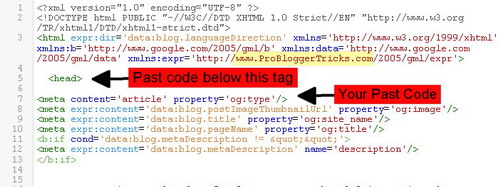
Facebook Incorrect,Post Thumbnail

  • Save Your Template


What You should know After Customization

Just before ending this post I think you should know this important Tips.
After correcting this problem of  Facebook Incorrect Post Thumbnail Issue in Blogger all your new posts from now will show correct picture thumbnail in facebook whenever you share the post.
You have to wait for like 3 to 4 days for your old posts to the correct Post thumbnail. Also note that you have to add the same code each time you change your blogger template.

Bonus tips and tricks To Show Right Post Image Thumbnail In Facebook

  • I just felt like sharing these basic blogger tips and tricks that will guide you on how to insert image in the right way inside blogger post. 
  • recommend you use PNG format for your main post image. Then you can use JPG image format for the rest of image you will insert in your post. 
  •  Make you of image tags and do not resize your image automatically inside your post.
  • Share your post on face immediately after publishing.


Conclusion:
Hope I have been able to help you through this article to resolve Facebook incorrect / no thumbnail issue in Blogger.  I know how frustrating this problem is, after composing your post, now to share to facebook which is a big source of traffic, and you got yourself stuck on this issue. Well I believe you have found solution today.
Please comment is it worked for you. If you still have any issue on this please do not hesitate to use the comment box.  
Share this post please..
Read More »

Friday, January 22, 2016


Best Ways to Make Money From Blogging 


Discover the best ways to actually make money from blogging. Blogging is one of the Top ways to make money on the Internet and in this post, I will be discussing on the 6 Top ways you can generate Income from your Blog and the good part of it is that It is simple and free. Many people have been blogging for months and even for years now without making even a dim from their blog why? Because you refused to see the other income stream ways of making money from your blog. Many are even planning to quit blogging simply because Google Adsense disapproved their Application.

In this post you will find out reasons why you will continue blogging and enjoy the fruit of your Labour. Because you will find out complete Best 6 Ways to Make Money From Blogging in fact not even from blogging but 7 Best ways to make Money from My BLOG, Yes that your blog which you are about to dump can generate thousands of naira for you. Alright let’s get to the point.


How To Make Money Blogging

>Pay Per Click (PPC).  

I believe you might have had about this many times. Per per Click is the most popular ways to make money from blogging and I know may bloggers already knows this . The basic concept of Pay Per Click (PPC) is placing advertisers banners or text ads in your blog and when a visitor clicks on these ads, you get a certain commission.
Your commission is based on the keyword price that the advertisers are bidding for, don’t worry I will talk more about Keywords in my next post.

How to make money from blog-6 top ways to make money blogging online
Lets Take for instance, Google Adsense. Google permits Independent Individuals ( Bloggers Like You ) to apply for adsense through their website where when approved, could have a chance to create a source of income out of their blog. Once You get approved for Adsense, you will have access to their dashboard where you will be able to generate ad codes you embed in your website to display ads. You get paid when your visitors click on that ad.

If you have tried Google Adsense PPC Application before but got disapproved, bellow are some Google Adsense Alternatives:
  • · Try Chitika
  • · Infolinks
  • · And VigLink
Without any Doubt Google Adsense remains the best pay per Click Ads Company that you can apply with and I know another person or blogger might have told you that It is the best existing ad network out there to monetize any website (as long as your blog/website comply with Google AdSense Program Policy or adhere to Webmaster Quality Guidelines).

>Private Advertising On Your Blog 


This platform allows Independent companies or even other bloggers to advertise you’re your blog. You offer to sell ad space on your website to them.

Here you are totally in charge. You can decide to fix the price or make the price completely negotiable and payment is usually per month.

However, before engaging your website to this type of advertisement, you must make sure that your blog receives a decent amount of traffic. When I say Traffic I mean genuine traffic from your Blog followers, email list and the visitors you receive from organic traffic (Search Engine Traffic)

>Offer Solo Ads Blast

This might sound new to many, but just in case you are not acquaintance with this advertising method, a solo ad is a one-time email blast you sell to a buyer who wants to advertise to your subscribers or to your email list.

This advertising method is usually employed by marketers not entirely for business to business blogs. For example if your blog is about “weight loss” and you built a good amount of email list of people seeking to lose weight, you are certainly good to go with this method. Here you offer to sell ads to vendors who sell products about weight loss, products like eBooks, video course, or whatever products they sell related to weight loss, you may consider using this solo ads technique.
I personally call it this method - 'the backdoor Selling Approach” 

> Affiliate marketing 


This is one of the most popular methods of monetizing a blog. This is done via affiliate marketing.
Affiliate Marketing is all about partnering with an independent business owners or some companies Market their products for them in your blog or website as the case may be.

Unlik PPC, affiliate marketing is a commission based monetization method, where you place a banner or text ads containing your affiliate link in your website. You will earn a certain percentage of commission each time a person makes a purchase from the affiliate link you placed on your blog.

You should note that the commission you receive is based from the percentage you agreed with the product owner.
For instance, if a particular product you are promoting is worth $59, and the affiliate commission set by the product owner is 45%, once you make a sale you make $26.55 commission - that's basically the idea.
To be successful in this method of blog monetization, it is advisable to promote products related to your website niche. If you are into Technology blog, you can monetize your blog by promoting products related to Technology such as Software, Electronics etc.

> Be your Own boss By Selling your own product. 

There are basically two types of Products you can sell as a blogger.

  • · Physical Products
  • · Digital Products
The physical products I mean here are tangible products such as t-shirts, books, shoes, etc.
The Digital products are products in the form of eBooks, PDF, Video courses and general digital products such as guides and tutorial. If your blog is about body fitness, then you can create video courses or eBook discussing how to burn fats, eating healthy, right exercise, etc.

In this platform ,you can even partner up with third party merchants to boost our sales. Third party merchants such as ClickBank, ShareASale, e-junkie etc, this is to engage your product in affiliate marketing program. This way, you are building a network of affiliate marketers who are willing to sell your product.
And when your affiliates make a sale, they'll get their commission, you'll get yours.

For in case you've tested a particular strategy that effectively worked for you, for example you accidentally discover a way on how to make money the most efficient way(assuming your blog is about business), then you can write an eBook discussing the methods you used, how it worked, your experience, your results then sell it to your visitors.

>Freelance via your blog.   


Freelance writing is one of the advantages of blogging. And it may occur to you that content marketing is one the best business marketing strategies used by top companies to pull massive traffic to their website. So if you are gifted in writing impressive and well researched SEO optimized blog post then Freelance content Writing is a sure way of making money as a blogger.

The good part of it is that you are totally in charge with the price for each of your articles. You can find your ideal customers at Craigslist, ProBlogger etc. or you register as a freelance article writer at Elance,Fiverr, etc

Conclusion
I have just above, listed 6 ways you can make money from blogging. So why not give blogging a short. Well there is nothing wrong if you decide to create a blog without monetizing it ,it is your choice but I think it would be more efficient if you start blogging today, in as much as u it takes nothing to create a blog and embed ad codes.

Note that the points I mentioned above is never a guarantee that if you implement any of the method that you will make millions as a blogger. This is because you success as a blogger blog depends on your actions(or inaction), and level of determination.
Read More »

Wednesday, November 11, 2015

Link Your BVN to all your accounts via internet,sms,email and ATM without visiting the Bank

How to Link Your BVN to all your accounts without visiting the Bank.

Not long ago, the CBN suspended all accounts that have not enrolled into the recent BVN program, both those that have enrolled with one of their account while they have multiple account were also affected because they have not linked it to their other account.

If you have enrolled for the BVN with a different bank before but yet to link your BVN with your other account number(s) may be you have gone to the bank but was disappointed because of the large queues in the banks; don’t worry and be happy because you can do that comfortably at home once you have internet enabled mobile phone or computer.

I had wanted to write this post but because the online multiple bank account linking to BVN was having issues when trying to link with other banks so I had to pause and wait when all has been verified. So the happy moment is here, all bugs and issues has been fixed and you can now Link your BVN with all your Bank account at the comfort of your home without stress of going to the bank.
Ok, enough of the talking. Follow the Bank links bellow which I have provided to link your BVN with your other bank accounts via their websites, email or SMS.

HOW TO LINK YOUR EXISTING BVN NUMBER TO OTHER BANKS IN NIGERIA WITHOUT GOING TO THE BANK.


For Guaranty Trust Bank
1.
Link your BVN through GTbank website:
Follow the steps bellow to link your existing BVN number to your GTbank account.
Simply do the following
·        Visit www.gtbank.com/bvnlinking
·        Enter your GTbank NUBAN
·        Select the Bank where your BVN was issued
·        Input the BVN number which you collected from another Bank, then click on submit.

2. Link your BVN via ATMs:
·        Insert your GTbank ATM Card
·        On the transaction menu screen, select BVN linking
·        Input your 11-Digit BVN
·        Confirm your BVN details
·        Then submit your BVN

3. The third GTbank BVN linking option is via Internet Banking:
·         Log on to Internet Banking and Select BVN Linker from the left-hand panel
·         Click on New Request from the drop down menu.
·        insert your Bank Verification Number
·        Select the Nigerian Bank where your BVN was issued
·        After all that you click on submit


FOR FIRST BANK NIG.       

Follow the URL bellow to link your BVN to your FIRST BANK account:
http://bvn.firstbanknigeria.com/form/

KEYSTONE BANK
Keystone Bank customers should follow the link bellow to link their BVN to their Keystone account
Simply visit the website below & supply your BVN details http://www.keystonebankng.com/bvnlink.php

FOR ECOBANK NIGERIA
Ecobank customers can easily link their existinig BVN to their ECOBANK account by simply dialling *326*9# using the phone number you created your ECOBANK account with and type in your BVN number then submit.
FOR ACCESS BANK
Follow the steps bellow to link your existing BVN number to your ACCESS BANK account.
With your Phone text “BVN” followed by your account number and your BVN number and send it to 20121. Example BVN 12345678901 7995333758 to 20121

 OR
You can use their online portal to link your BVN, just follow here http://bvnlinking.accessbankplc.com:8080/bvnlinking/bvn.jsp

FOR FCMB
Link your BVN to your FCMB account through the FCMB internet banking portal for those registered for e-banking, all you need to do is to login to your accountègo to your profileèthen under “NO BVN LINK HERE” just click there and link your BVN.


OR

FCMB BVN Linking by email
All you need to do is to send an email to customerservice@fcmb.com in the email just include the following:
·        Account name
·        Account number
·        BVN number bank you initially registered and got your BVN number from


FOR DIAMOND BANK
• Link your BVN number to your DIAMOND account via email. Send your BVN details via email to  enquiries@diamondbank.com or SMS to 30811
• You can always call their 24hour contact centre on 07003000000

FOR FIDELITY BANK
Link your BVN to your FIDELITY BANK account by sending your account details, mobile number, BVN, bank/date of registration and date of birth via mail to true.serve@fidelitybank.ng

FOR SKYEBANK
If you make use of skye bank e-banking,  login to your account & go to your profile then LINK your BVN from there.
OR
Send an email to Skye bank yescenter@skybankng.com , your email should contain the following details:

·        Account name
·        Account number
·        BVN number
·        bank you initially registered and got your BVN number from


FOR United Bank for Africa (UBA)
UBA customers just needs to dial the short code *919*6# with the phone number that was used to open the account

UBA customers can also link their BVN online from UBA website here:
http://uapps.ubagroup.com/linkbvn/

FOR Zenith Bank
All you need do is just tweet to @ZenithBank on twitter and request for BVN update form. Fill the form and send it back to zenithdirect@zenithbank.com

I hope this piece of information helps. Please if your bank is not listed above, all you need to do is to walk in to any branch of your bank and request for the BVN linking form from their customer service personnel. 
Don’t read alone click SHARE button to share with friends. We also Love Comments..
Read More »

Thursday, April 23, 2015

A friend of mine was trying to fill an Application form online yesterday , but He got to a level where they required him to insert the Postal code . He tried making some research through google but he couldn't get a reasonable solution until he decided to contact me which i was able to explain to him how and where to get the postal code of Enugu State.

In respect to this, I have decided in this post to share with you how to get the postal code of Enugu state and other states in Nigeria.

Note: The use of Zip code is only applied in USA states but in the absence of that, Postal code is used. So if you are filling any form online as a Nigerian and you get to the point to enter a zip code simply insert the Nigeria postal code.

How To Get Postal Code For My Address In Nigeria 

  • visit http://www.nigeriapostcodes.com
  • Select your State
  • Select a nearby town, area and your street
  • Finally click on "Get Postcode"

Your post code will be displayed to you..


Bellow are the postal codes of the states in Nigeria you can use, and to get the specific postal code of your particular area or street , you need to follow the procedures I stated above.
  • Osun 230001
  • Oyo 200001
  • Plateau 930001
  • Rivers 500001
  • Enugu 400001
  • Imo 460001
  • Jigawa 720001
  • Kano 700001
  • Kaduna 800001
  • Kwara 240001
  • Taraba 660001
  • Yobe 320001
  • Ebonyi 840001
  • Katsina 820001
  • Kebbi 860001
  • Abuja 900001
  • Lagos (Island) 101001
  • Lagos (Mainland) 100001
  • Niger 920001
  • Ogun 110001
  • Abia 440001
  • Sokoto 840001
  • Borno 600001
  • Delta 320001
  • Edo 300001
  • Ondo 340001
I Hope this post Helps..

Do not forget so SHARE with your friends
Read More »

Saturday, March 21, 2015

This Post is to show how you can create and submit a site map to google.. But First ,
What Is Google Sitemap?.

Google site map is a file in XML  format that contain all your website links or pages.. Its a great seo tool for webmasters as it makes google to be aware of all your website pages.

I also want to make it known that submitting your sitemap to Google does not guarantee site/blog ranking .. Its just for Google to have access to your pages for crawling ..

How DO I Create A Sitemap..

> If you make use of Wordpress blog, there are many Seo Plugins that can automatically create and submit your site map to google such as All in one Seo Plugin , it will do all the work for you.

> If your make use of blogger blog, like this one , then your need to create an account in Google Webmaster Tool , then Login into your account with blogger/site details.. Go to the sitemap link and you shall find some useful details and instructions to create your sitemap .

> Those with static website, then you need to Create your sitemap manually..
You can do that by using an Online Sitemap Generator ,

NOTE:

Remember you need to create Webmaster Tool Account before you can submit your site and also verify the ownership of your site , its only then you will be able to submit your site map manually.

How to Submit Your Sitemap To Google..

Sign in to your webmaster Tool account, click on Crawl and Select site map.

Click On Add/Test Sitemap 

Next is to submit the file name of the sitemap you created , it will look like SITEMAP.XML


please if you make use of WordPress plugin in creating your sitemap, go to the plugin settings in the admin panel. You will find the name of the sitemap there.

When you are done then, click and submit the sitemap and you have successfully created and submitted your sitemap to google! Now Google has an up-to-date listing of all your pages.

Google will automatically re-crawl your site once you make any new update...

Hope this helps, Please share 
Read More »

Monday, March 2, 2015

Making money as a student in Nigeria Is not as difficult as people think.. Yes Education in Nigeria is very difficult especially when you don't have enough money..
In this post i will show you many ways to make money while in school.. Some businesses you can start with little capital.. Here I will share some tips that will help you put some cash in your pocket.

The following Avenues bellow will help you get some bucks while in school..

1. Making Use Of  Your Skill..

If you have any skill at all as a student why not develop it to yield money for you.. I know of a female student in my school that is very good in making chin-chin, what she does is to make some chin-chin and supply to shops in the school, it might look local in your eye but i tell you Students buy it very well.. Are you good in hair dressing , you can work part time in many saloons located close to your Area . And for the guys You can also do the same, discover your Skill and it.. A boy in my Hostel sells sachet water, Recharge Cards and Indomie, So we always buy from him instead of going outside the compound to buy them and he is making money from it.. You can start doing the same in your Hostel..

2. Making money money online as a freelancer[fiverr].

Freelancing is not just meant for students alone but also for everybody . I included it here because many students still do not believe that making money online is not real.. But the truth is that you can make a good amount of money on the internet in many ways which becoming a freelancer is one of them. I made mention of Fiverr because it is the simplest place to start making money online..

Fiverr is a freelancing website where you get paid $5 for services you are capable of rendering, you can earn more than that when you become a level one seller or level two seller..

So Which services can you offer on fiverr?
Services you can offer on fiverr ranges from:-
= Article writing
= Sketch Drawing ( If you are good in Drawing )
= Graphic Designs
= Logo Designs
= Modelling...etc...
Go Here to register an account on fiverr


Above is just a screenshot of one of my fiverr accounts that i opened not more than two weeks ago. I have made over  N 18,000 when you convert to Naira and I have three accounts..  I  know some people that make much more than that here in Nigeria. So you see there is a lot of money to be made on fiverr. If you need more info just comment or use the contact form..

3. Taking Photograph

I will not talk much here because i believe you all know it all.. taking photo shuts in school both passport and full album photo. I cant tell you how much you can make in this business but people into it do make a good money..


4. Making Money Blogging

You can make good money online as a student with blogging.. Though you need a Laptop for you to venture into blogging. You might have heard about making money with blog , It is very much possible, blogging is all about being creative and determined . Its not a get-rich quick business it requires Determination.. You also need to ask you self which type of Niche you will like to venture into ( what you want to blog about), ranging from , Tech and Info Blog, News and Entertainment etc.. Once you have taken all this in consideration then you head over to www.blogger.com and get started..


5. Making Use Of Your Intelligence

Are you a Genus or very Intelligent? You can make good money while in school with your intelligency by writing Assignments and Projects for other Students.. When I was in my 100 level i made good money from this means.. The lazy ones will come to me to help them with their assignments , " the big guys and the big girls " in our class.. All i do is tell them how much they will pay me depending on how hard and number of the assignment...

I will stop here.. There are many other ways to make money while studying here in Nigeria.. If you need more info please use the contact form or send me an email or use the comment box...
Hope this helps..
Read More »

Sunday, February 15, 2015

Here is the end of your search..
I spent hours trying to find where to get godaddy.com real and working coupon promo code.. To be sincere its never easy to find a real working one..
But after many hours of searching I succeeded and that is what am about to reveal to you so that you will not spend your time searching again ; I have done that for you.

How I Bought 2 years domain name with just $10 from Godaddy

Actually this blog will take a new name in no distance time.. Yes i will tell you the reason soon.
I just bought a new domain from godaddy and after implementing the promo code , I was marveled at the great discount i got.. Before was $16 but after I implemented the promo code the cost was reduced to $10 thats is $6 off.. Is that not great..? Am sure you are waiting to here the link to the coupon promo code..

Why you Should Buy A Domain name From Godaddy.

Here are few tips why you should buy a domain name from godaddy.
1. It is owned by Google:- Yes www.godaddy.com  is owned by google the top web search engine. I tell you for better seo and search engine optimization I recommend you used them because they will optimize you domain to their search engine and also to yahoo and bing..
2. Domain Security:- They also offer the best protective domain security service. They will protect your domain identity from the web.

There are many other benefits and reasons to use godaddy.. But i just have to stop here..
Now You can get many godaddy coupon codes upto 85% discount coupon codes HERE

To use the coupon code, when you might have gotten your preferred domain name or web hosting , just before you finalize your payment, scroll down at the left side you will see where to insert your promo code.. See sample picture bellow


Insert the promo code you got from the link i gave you and Click on APPLY.. You will be amazed at the great discount you will get..

I have to Stop here.. I hope this helps.. SHARE, And COMMENT pls..

In my next post i will share to you why i decided to change my domain name [www.bloggercheat.com]. Stay tuned..
Read More »

Monday, February 2, 2015


The purpose of this post is to show you how you can share your new blog post automatically to Google+ without viewing the post..

What is Google+

Google+ (or Google Plus) is a social media networking and identity service that is owned and operated by Google Inc.. I will not talk more on Google+ because I know as a blogger with your Gmail account ,that you already have a Google Plus account..

Google+ is also one of the Top means to rank your blog in search Engine.. I will Talk about that later

Follow this steps to share your New blog Post Automatically to Google+ at the point of publication.

How To Share Post To Google+ Automatically

1. Visit www.blogger.com/home and sign in.
2. Select your blog from the dashboard
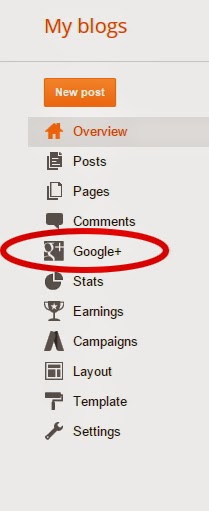
3. On your Blog Dashboard select the Google+ Icon Located at the left hand side..( see picture Sample Bellow)


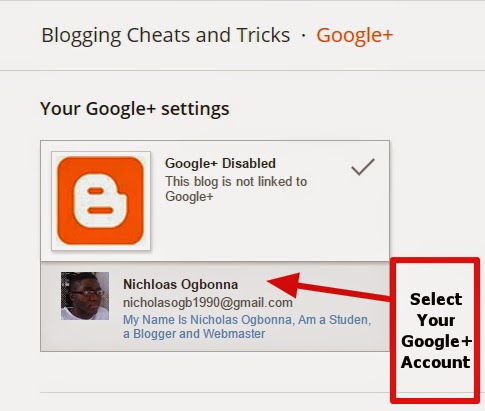
4. After that, Link and Select your Google account ,If you have may account just select  the one you will like to use..

5. Note: If you You are using Blogger As Default then you have to link your Google+ account With blogger before this step.
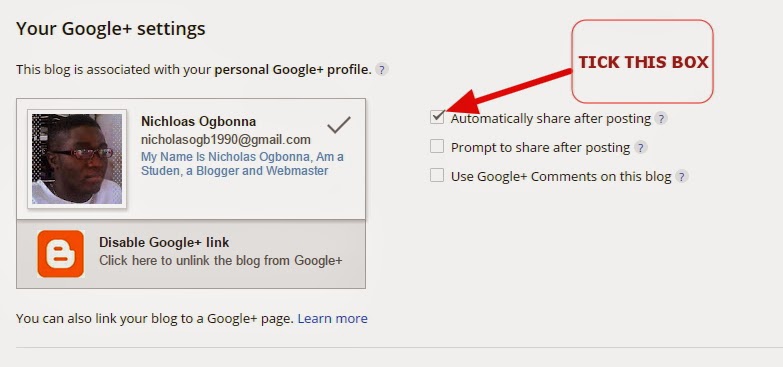
6. You will notice a small box by the left hand side when you select your google plus account.
7. Tick the box with ''Automatically Share After Posting''


That is all, no need of viewing the post then clicking on share buttons any more . Because you can do it automatically. I hope this Helps.. Comment And Share

Read More »

Friday, January 30, 2015

Getting high rankings in search engines might seem like a completely impossible task.
In fact, you might ask how you—a person with relatively little money and few
resources—can outcompete large, well-funded corporations when it comes to search engine ranking.
Is it indeed possible at all? Or is it simply bait that shovel-sellers use to trick you into
purchasing a product? “Yes, you too could rank #1 on Google in 24 hours!” We’ve all
heard this line and similar ones.

I have good news for you: obtaining top rankings on Google isn’t really something you
could do overnight. And that’s a good thing. Otherwise, other marketers could use the
same trick to get ahead of you easily. Instead, getting top rankings on search engines is
a slow, but rational, process. And the whole process starts with the creation of your
affiliate site.
You might not realize this initially, but creating an affiliate site—as opposed to selling all
of your own content—gives you a number of distinct advantages over people who are
selling their own products. First, it allows you to quickly create an entire site around a
much focused topic. Why is this important?
For one simple reason: the more narrowly focused your website is around a particular
topic, the better it will rank on search engines. If, for instance, your site is a
conglomeration of 35 different sales pages on totally unrelated topics, you will not rank
well. If, on the other hand, your site only contains information about cranberry sauce,
then you are likely to rank very well on keywords related to cranberry sauce.

Now, in addition to affirming the above (that affiliate sites can rank well in search
engines), it is also important to emphasize that you should limit the scope of your site
insofar as it is practical. Additionally, while you might sell products you created yourself,
you should use content that you created (or hired someone else to create).
Articles scraped from directories and copied-and-pasted salesletters are duplicate
content and are unlikely to help you perform better on the search engines.
However, with that said, there are a number of ways in which you can quickly generate
information about affiliate products that you couldn’t do otherwise.
create content for affiliate sites is to create a “top 10 product” section, where you can
include reviews on the best CB products for that particular niche.

If you haven’t actually used the products, you don’t have to claim that you did. All you
have to do is summarize points in the salesletters (and explain that this is what you are
doing) and paraphrase testimonials. This will allow you to give visitors the short version
of the salesletter, which will count as unique content for your site.
Other ways to improve your search engine rankings include things such purchasing
massive amounts of unique, focused, relevant content (i.e. articles, reports, etc.) and
uploading them to your site.

For instance, you could do keyword research on your topic, find keywords that receive a
lot of queries (but do not have a lot of sites returned on Google), and hire a ghostwriter
at http://www.elance.com to create an article optimized for each.
However you decide to generate traffic for your site, keep this in mind: you cannot get a
top ranking in Google overnight. It simply doesn’t happen. You can do it, but it will
require work. And when you finally do get that spot—and the traffic starts rolling in—
you’ll be happy that those 24-hour tricks are myth, rather than reality.
Read More »

Monday, November 17, 2014

Here are few tips on how to restore your backed up blogger template..
In my last post i shared few tips and the important of backing up your blog Template..
Now i will show you how to Restore it..

Follow me as i unleash this Idea..

So How Do I Restore My Blog Template..?

==> Sign in to your blogger account @ www.blogger.com/home
==> Select your Blog on the Dashboard
==> Click on Template


==> Select Backup / Restore located just at the top right hand. See image sample bellow


==> A pup up window will appear , simply click on Choose File and find the location you stored your Already Downloaded / Backed Up Template and Click on Upload.

That's all and your blog will restore to its view prior to the time you backed up the template you just restored .I love comments, so tell me if it worked for you in the comment box..
Read More »

Wednesday, November 5, 2014


Backing your blog template is a very important thing to do for every blogger.  It will help you to revert any bad changes you made in your blog that you might not like. all you need to do is to restore the back up.
Your Blogger template back up will also be handy in situations whereby you want to revert your blog back to an old design after uploading a new template

Backing up your blog is made easy by blogger.. Just follow the simple steps bellow.

==> Sign in to www.blogger.com/home and select your blog in the dashboard.
==> Click on "Template"


==> Click on the the "Backup/Restore" located at the top right corner.


==> A pop-up window will appear ( see the image bellow for sample).


==> Click on the "Download Full |Template"
==> Choose where you want to save the template in your computer and click the Save button

You can rename it ,to include the date and time you created the backup.. You can also upload it to the cloud such as Dropbox, Mediafire,google drive etc for easy assess whenever you need it.
Read More »

Friday, October 17, 2014


Facebook is one and most visited website in the world today .. And also a great avenue to pull traffic to your blog.

Facebook Fan Box / Like Box is a great plugin that allow blog or website visitors to subscribe to your blog updates by liking your page.  This will enable your fans to get your post update one it is published.. Before creating a facebook like box, i believe you already have a Facebook Fan Page...

Now this is how to Create a Facebook Like Box..

1. First of all, you need to find out your fanpage URL by visiting your fan page. Copy the url , see how your url should look like in the image bellow..
https://blogger.googleusercontent.com/img/b/R29vZ2xl/AVvXsEhgHAsV1nZrD997-0A1dVcmSp8MwQpaZ3f2j4tJNDpIovvCTdo3VRQOUFWwLNgRXmaq1vjR2oVbmO1FMuhCwLrLTMEHZn_WTvgRoMRczAnxdG1XaauGTghl2nN1qosgBqv67P_2theuEw0/s1600/How+To+Add+Facebook+Like+Fanpage+box+To+Blogger-bloggercheat.jpg
Copy your url .. Please Note that my own url is customized ,you can also customize yours...

2. After you copy your url, head straight to this page https://developers.facebook.com/docs/plugins/like-box-for-pages

3. Paste your Fan Page Url in the url field as it is shown bellow

https://blogger.googleusercontent.com/img/b/R29vZ2xl/AVvXsEguJ2OEf7XasHX1qheNoIEnIsj2dL76QB-R6VUsTejMtT5SEJrh4NEDQYgp4RUvJw1aQJQd6H9k9pSoBEeZ_9Aw7Kc2Axw-rb8gvXJR-MtbeHHDObVZ9Cz6YZxgoKelwr99jfhTPvpl3_8/s1600/How+To+Add+Facebook+Like+Fanpage+box+To+Blogger-bloggercheat-dot-com.jpg

4. Once you are satisfied with the looks of the like box, click on "Get Code"

5. Then you will be provided with three different codes ( HTML5 , XFBML , IFRAME).. The one we need here is the iframe. Sellect and copy the code generated..  See the image example bellow

https://blogger.googleusercontent.com/img/b/R29vZ2xl/AVvXsEhi3c96M2rQ8zeuAeRLiTXAmTEUNBXLLFrIeR2hymurcIT6AwsohFfz5p7DXHVJ9RPVWnIqnsK7zj0sxc7o6j8huV_zx7Jv-pc9klUR1qOSwB1lEyeltmHYjHD448WfgBKQY0-g29lJ8iM/s1600/How+To+Add+Facebook+Like+Fanpage+box+To+Blogger-bloggercheat-dot-com1.jpg


Now Adding the facebook Fan page box To Blogger

6. Now login to your blogger account , go to 'Layout' and select/click on the add  Gadget


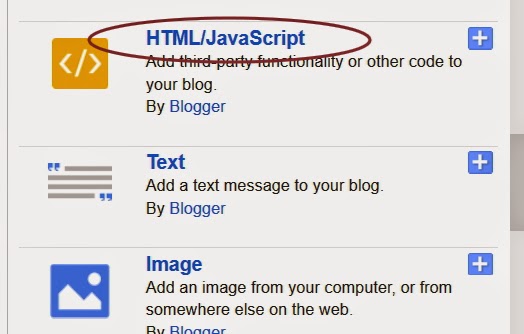
7. A pop-up will show up, scroll down and select the 'HTML/Javascript' gadget.


8. Paste the Facebook Fan Page Like Code you generated in the empy HTML box


9. Click Save and you are done, used the comment box if you encounter any problem am here to help you out..

Read More »

Monday, October 6, 2014


I just decided to share this great script or cheat to you all my readers, this works like magic.

I know many of you have been searching for working twiends seed cheat for getting many numbers of seeds..

For those that don't know what twiends means, Its a social exchange network only for twitter followers, where you follow others on twitter while getting  seeds or points for your own twitter followers campaign ..

Now this is how the script works..

First Step:Visit twiends HERE and login with your Twitter Account..You will be redirected to twitter where you will be required to authorize the website ..

Second Step: Here i prefer using chrome browser for easy control..For the best results, make the following settings on Twiends:Seeds offered - 2 (minimum)
Country - USA (unless you want to target a different country)Autofollowback anyone with seeds.
 when you have linked your twiends with twitter  on your twiend home page press the
CTRL+SHIFT+J then paste the java code below, and hit enter . And watch your twiends seeds seed grow.

javascript: /* wiztechie.com */ function tr_f() { var followlinks = []; for (var i=0; i < document.links.length; i++) {if (document.links[i].getAttribute("class")=="follow"){followlinks[followlinks.length] = document.links[i];}} /* wiztechie.com */ for (var i=0; i<followlinks.length; i++) {var rrr=followlinks[i].onclick();} } tr_f();


If you are using other browser apart from chrome just paste the code in your browser bar.

In my nest post i will show you how to Mass Unfollow twitter following..
Read More »

Wednesday, October 1, 2014


Hello Readers and Friends , after many complains i here from my friends and others, asking if there are any way they can download interesting paid apps / applications in their Android devices from Google Play Store, Then i decided to make some research and i can up with this Post..

Here am sharing to you my recent findings on how you can download all paid Android Applications from Google Play Store For Absolutely FREE. Yes you Heard me right FREE..

Many Apps are been released on daily basis into the Google Play Store. And you find out that over 99% of Interesting Applications there are Paid Apps.
Why are they paid Apps? This is because it took the App Developers many Time and Hard work to Develop so they put up this little fees in compensation for their hard work..

But am here to help you to get Access to those paid Applications for Free if you follow the simple steps am about to reveal to you now..

= You need To Download Blackmart Alpha Application . You can download from HERE
= After Downloading, Install it in Your Android Smart phone or Tablet.
= Now open your google play Store App and search for the paid Application that you wish to Download.
= When you see the application, Note the name
= Now open your Blackmart Alpha Application and insert the Application name in the search box and Search
= You will find that particular App which is paid in Google Play Store in the Blackmart , And Download for Free
= Install the Downloaded Application and Enjoy.

Don't Forget to share this post with your friends and check  my other post....

Subscribe to my blogger feeds and get all the post direct too your Email 

                                      Follow Us In Twitter :
Read More »

Saturday, September 27, 2014


Follow Us In Twitter :


It could be quit embarrassing when you are trying to type or do some important things with your Blackberry but notice that it hangs and this can last up to 2mins..

Have you considered clearing your phone log? This could lead to it as many unwanted logs are in your phone memory..

Follow this simple steps to clear  Your Blackberry logs and feel the new speed..

To Clear Your Log simply Hold  and press this keys....

***** Hold the '' alt and Press lglg
***** You will see lists of event log ( see picture bellow )

*****Now press the menu  button and select the clear log button
*****Press OK
That's all..

Share and comment if it worked for you..
Read More »

Monday, September 22, 2014


This is a simple method / Steps to unlock your HTC android phone when you forget your password or lock pattern ..
It also work for other android phones such as Tecno.

Follow this simple Steps to unlock your HTC Android phone when you forget the password or pattern lock..

Step.1- Switch off your fone by pushing and holding the
power button

Step.2- Press on the power button and
the down- volume button simultaneously (Power-on+Down-volume buttons) 

Step.3- On the next display that shows up, you will
glimpse about four 

Step.4 choices, select ‘Factory Set”or “Reset”. You can use the Volume-Up or Volume-
Down button to navigate to either down or up.

The factory setting starts immediately on confirmation and when the entire process
completes, the phone will boots up again without the pattern secure or security code afresh. !!!….. 
This method of resetting pattern secure works and rock with all types of HTC Android phones and with some Samsung and Tecno Android phones…..!!!!!

Am ready to attend to your questions ,that's if there is any.

Enjoy
Follow Us In Twitter :
Read More »

Sunday, September 21, 2014


Bypass Icloud Screen Lock for all IOS users without entering icloud password ..

So you don't have to worry again when you forget your icluod login details or sell your devise without restoring them..

Thanks to a new tool from smartphone unlock provider ChronicUnlocks...

Apple’s Activation Lock, introduced last year alongside iOS 7, is designed to curb the theft of iPhones, iPads, and other iOS devices by preventing them from being restored and reactivated without the original owner’s iCloud password. It means thieves cannot wipe devices after they have been stolen and therefore makes them harder to sell on the black market.

The feature has been very effective since its launch. A June report from The New York Times revealed that iPhone robberies in San Francisco had dropped 38 percent since Activation Lock was introduced last September, while those in New York City fell 19 percent. But bypassing that lock is now a great deal easier — if you have the money.

This tool shouldn’t help thieves sell stolen iPhones, then, but it should help genuine owners regain access to their devices after forgetting their iCloud password. It is a tad pricey, but it’s certainly a great deal cheaper than a new device.

This software now works on any iPhone , iPod and iPad and it is for free

You can read more about the app @ http://www.bypassicloudactivationlock.net/

Thanks and Share...
Read More »

Sunday, August 17, 2014

Going with the recent growth on online business, Many Companies and individuals  are now moving their Business online..
Its your time to join the moving train.. If you have a little business you do why not try and move it online.. You can start with just a free blogger..
Read More »